
Now taking waitlist · founding pricing

The Claude course I kept getting asked to make.

I've run my own recruitment agency for a decade. I'm not some kid selling a course. This is everything I use AI for, with detailed walkthroughs, built on real data and real workflows. Not diagrams that look good on LinkedIn.

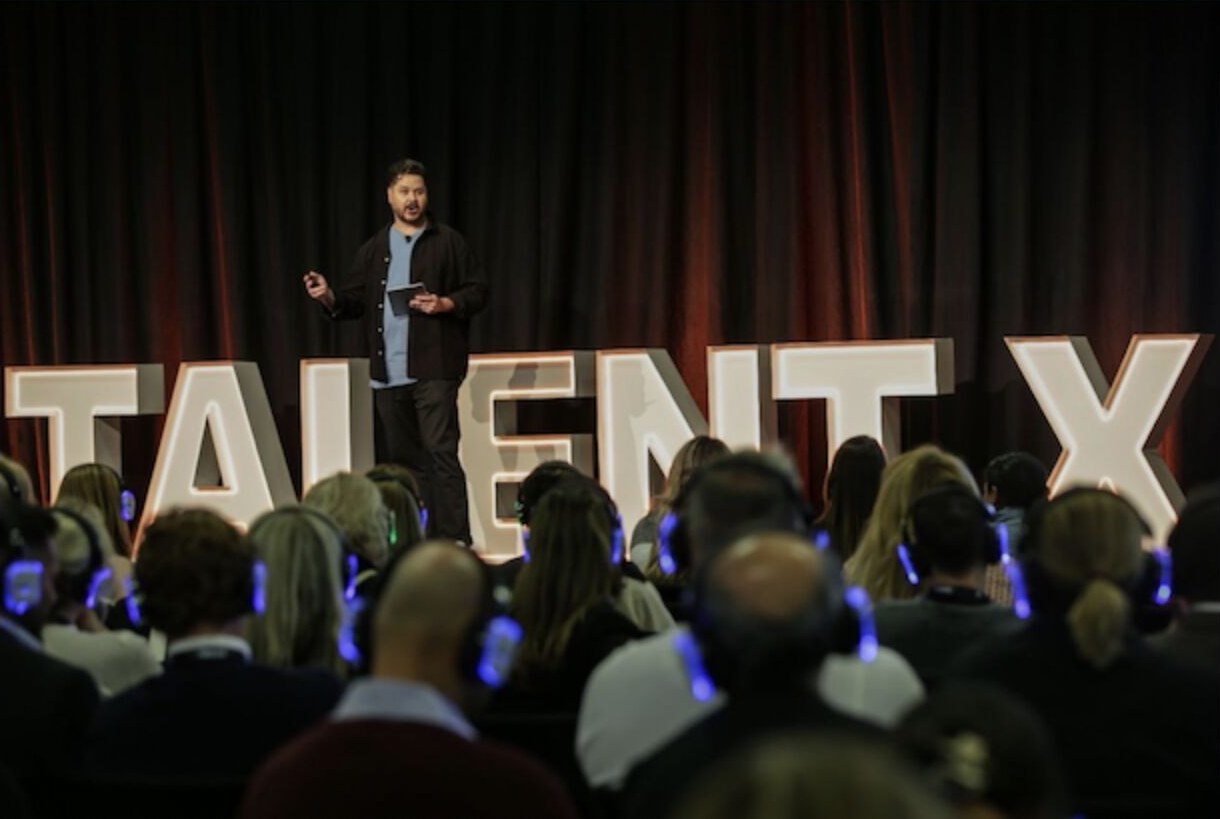
John Bourke on stage at Talent X, speaking on AI and automation in recruitment
Talent X · on AI & automation in recruitment

I kept getting asked, so I made this.

Lately I've been doing talks on the Recruitment United podcast and webinars for the RCSA, and afterwards the same thing kept happening: people would message me directly asking how I actually use Claude in the business. Enough times that I figured I'd just put it all in one place.

Here's where I'm coming from. I ran a recruitment agency in Sydney for 8 years, fully automated and fully running on AI, and I was up on stage at Talent X talking about AI in recruitment four years ago, well before most of the industry had touched it. Then I built RecView, an AI notetaker made specifically for recruitment agencies, which has since raised seed funding, including from the RCSA.

So this isn't theory from someone who read a thread. It's a small, cheap, easy-to-use course. I jump on once a month to answer whatever you've got, and in between, you and your team work through my video tutorials, resources and downloads at your own pace.

8 yrs
running an AI-first agency
RecView
seed-funded, incl. the RCSA
Talent X
spoke on AI 4 years ago

What you'll learn.

Nine modules. First you build the assistant: set it up, plug it into your tools, and let it run tasks on its own. Then you make it look the part and easy to find. Then you point it at the real work: sourcing, BD and ops. Each one's the same simple shape: what it covers in a line, then the practical things you'll walk away able to do.

01 foundations

Get set up: skills, plugins, connections

Stand up your workspace and meet the three building blocks everything else runs on: skills, plugins and connections.

Setting Claude up the right way from day one
What skills, plugins and connections each actually do
Your first one running real recruitment work
02 connections

Plug Claude into your tools

Link Claude to where your work already lives (inbox, calendar, ATS, LinkedIn) so it works off real data, not copy-paste.

Connecting your inbox, calendar and ATS
Wiring up LinkedIn and your sourcing tools
Letting Claude read and write where you work
03 automation

Tasks that run themselves

Set up recurring jobs that do the work while you're on the phone: the morning brief, the chase list, the pipeline tidy-up.

Scheduling a task to run every morning
Recurring chasers, updates and reports
Handing repeat admin off for good
04 assistants

Build your first AI assistant

Put modules 1–3 together into one assistant that knows your desk and works the way you do.

Combining setup, connections and tasks into one
Teaching it your voice and your process
A working assistant you run from day one
05 design

Claude Design: look the part

Use Claude to shape your brand and candidate-facing creative so a small agency looks like a serious one.

A look-and-feel Claude sticks to every time
Job ads and social posts that don't look generic
On-brand templates you reuse without a designer
06 web + seo

Drag your website out of 2011, and win SEO

Rebuild or refresh your agency site with Claude, then make sure clients and candidates actually find it.

A fast, modern site you can edit yourself
Pages and job ads that search engines rank
Tracking what's working without the jargon
07 sourcing

Sourcing on autopilot

Point your assistant at the candidate side: search, screen and shortlist without the slog.

Turning a spec into searches that work
Screening CVs against the must-haves
A callable shortlist, ranked and ready
08 business dev

BD without the cold-call dread

Research targets, find the real angle, and run outreach that sounds like you, not a template.

Researching a company before you reach out
A reason to call that's actually relevant
Outreach and follow-ups in your voice
09 ops

Ops that runs the back of the desk

Hand the repetitive desk work to your assistant (formatting, logging, chasing, reporting) so nothing slips.

CVs and notes in your house style, automatically
Your ATS kept tidy without retyping
The chasers and reports that run themselves

// Modules may shift slightly before launch. The shape won't.

Two ways in.

Pick the one that fits your team. Annual, flat, no per-seat creep.

Solo / Small Desk
Up to 5 people
$250 /year
Everything in the course
The monthly live Q&A call with me
All video tutorials, resources & downloads
Share one login across your desk, that's completely fine
Join the waitlist

What's included, plainly.

A monthly live Q&A call

Bring whatever you're stuck on. I jump on once a month and we work through it together.

Self-paced video tutorials

Short, practical walkthroughs you can follow on your own time, no deadlines.

Resources & downloads

Prompts, templates and setups you can lift straight into your own desk.

Access for your whole team

It's not just for you. Bring the people who'll actually run it day to day.

Before you ask.

Do I need to be technical?

No. If you can use email and a browser, you're fine. I start from a blank slate and build up. Nothing here assumes you can code.

How much time does this take?

As little as you want. It's self-paced: watch a tutorial, try it on a real role, then bring questions to the monthly call. No deadlines, no homework guilt.

Is this just generic AI tips?

No. It's built around running a recruitment desk, because that's what I did for 8 years. The examples are roles, candidates, clients and the admin that actually eats your day.

Can my whole team use it?

Yes. Solo / Small Desk is happy for up to 5 people to share a login. Bigger teams get named logins and progress tracking on the Agency plan.

Why's it so cheap?

Because I'd rather a lot of agencies actually use this than a few pay a fortune. It also helps fund RecView, so it doesn't need to be a profit centre.

When does it launch?

Soon. Join the waitlist and I'll email you the date. Waitlist folks get founding pricing before it goes up.

Want in?

Drop your email and I'll send you the launch date and your founding-cohort spot. No spam, just the one email that matters.